One AI assistant, one accountant, no confusion
Designing Musaed, Rewaa’s AI assistant, so merchants who are not accountants know who is helping them, what each helper can see, and when a human takes over.
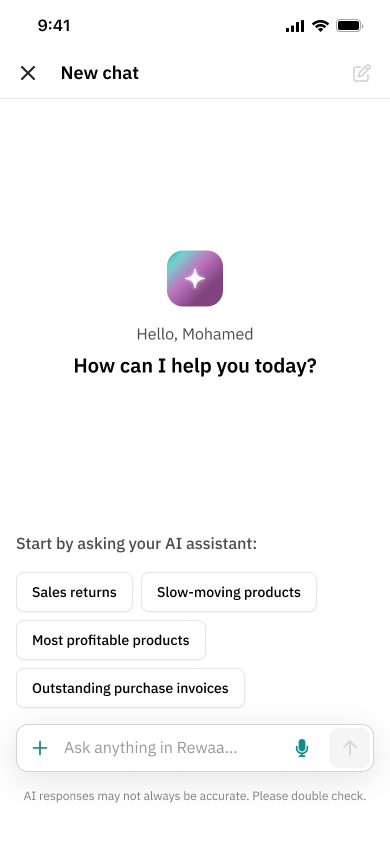
AI responses may not always be accurate. Please double check.
Merchants had two helpers, one automated and one human. The product was supposed to make the line between them obvious. It did not.
Merchants thought their accountant could read the AI chat, and one accountant could only serve 10 to 15 clients.
Research with accountants and merchants, an invoice-from-a-photo flow with four “ask, don’t guess” moments, and four small trust cues.
0 → 130 merchants in the first month. The design’s own impact isn’t measured yet.
The context
Musaed lives inside Rewaa and helps Saudi merchants with bookkeeping in Arabic: logging expenses and purchase orders from a photo, categorizing them, handling tax and payment method. Merchants on the Full-Stack Accounting subscription also get a human accountant, reachable by chat in the same product.
Merchants in the AI chat believed their accountant could read it.
They never opened the side menu where the accountant lived, so they neither found the accountant nor understood that the two conversations were separate.
The business side had its own number. One client with 350 transactions a month takes an accountant about 17.5 working days to process by hand, roughly 80% of one person’s month. That is why an accountant tops out at 10 to 15 clients.
The obvious fix was clever, and too big to ship.
I first designed a handoff flow: the AI recognizes a message that needs human judgment and offers to send it to the accountant, with a confirmation card. It was a good concept. It was also new AI logic that engineering could not build quickly, and the product manager had proposed a different entry-point design of their own.
The real task was to fix the mental model with the smallest change that engineering could actually ship, and keep the better idea for later.
Finding the real constraint
The brief split into two questions: what is going wrong for merchants, and is this design of the fix good enough to build? I worked from the real conversations first: a 332-page export of Musaed’s expense-agent sessions, with session, user, author, timestamp and the Arabic message text on every row, paired with the usage problem the team reported on the accountant chat. Then I ran discovery, and the work changed the question.
Journey mapping, where it started
Before any interview guide I mapped the accountant’s whole year with a client: 3 stages (onboarding and setup, ongoing operations, tax filing), 14 steps, and for every step the task, whether it is manual or automatic, what the client does, the frictions, the pain points, the time it takes and the opportunities. I wrote it from the accountant’s side, in the Arabic they actually use, because the language of the tasks (“open every invoice, enter the date, number, amount, tax, category and payment method”) is what the product would later have to take over.
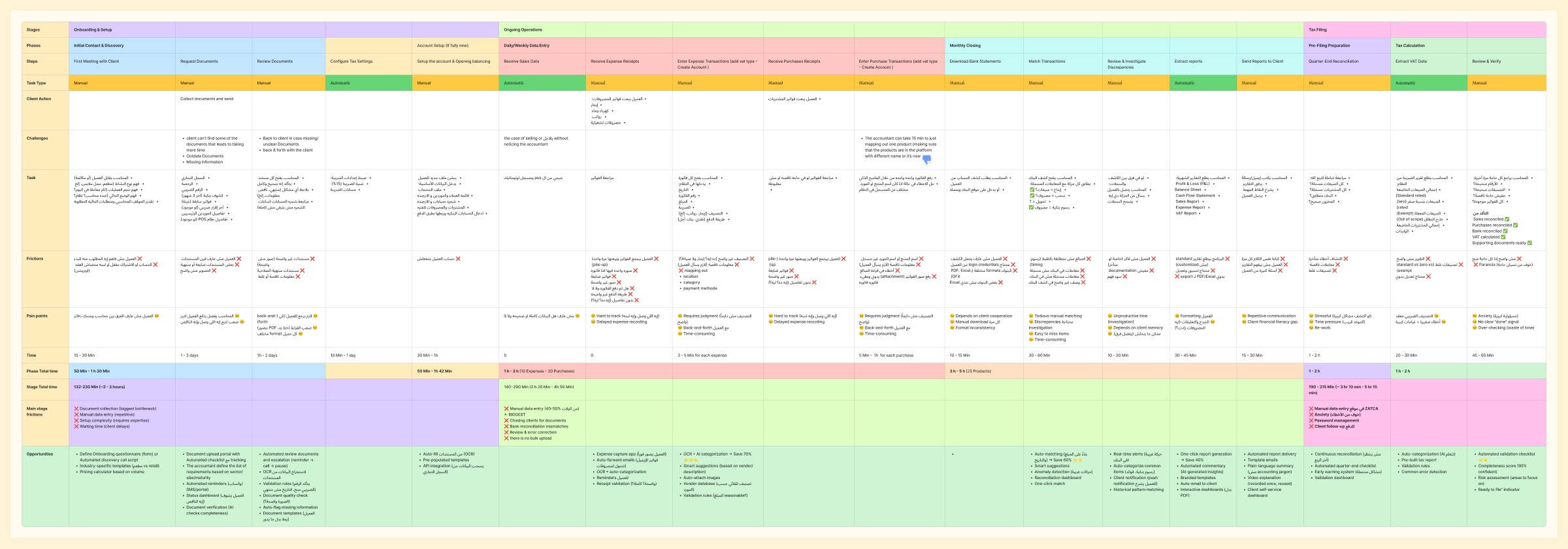
The map turned a feeling (“accounting is slow”) into a budget of time per stage:
| Stage | Estimated time | Biggest friction |
|---|---|---|
| Onboarding and setup | 2 to 3 hours | Document collection, the main bottleneck, plus manual data entry and waiting on the client |
| Ongoing operations | 2h20 to 4h50 | Manual data entry, about 40 to 50% of the time, plus chasing documents and no bulk upload |
| Tax filing | 3h10 to 5h15 | Re-entering data into the ZATCA site, fear of mistakes, chasing clients for payment |
These times are estimates from accountant conversations, not measurements. Two details became the seed of the AI workflow: entering one expense takes 3 to 5 minutes, and entering one purchase takes anywhere from 5 minutes to an hour, partly because the accountant can spend 15 minutes just mapping one product to see whether it is already in the system under a different name.
Interviews with three groups
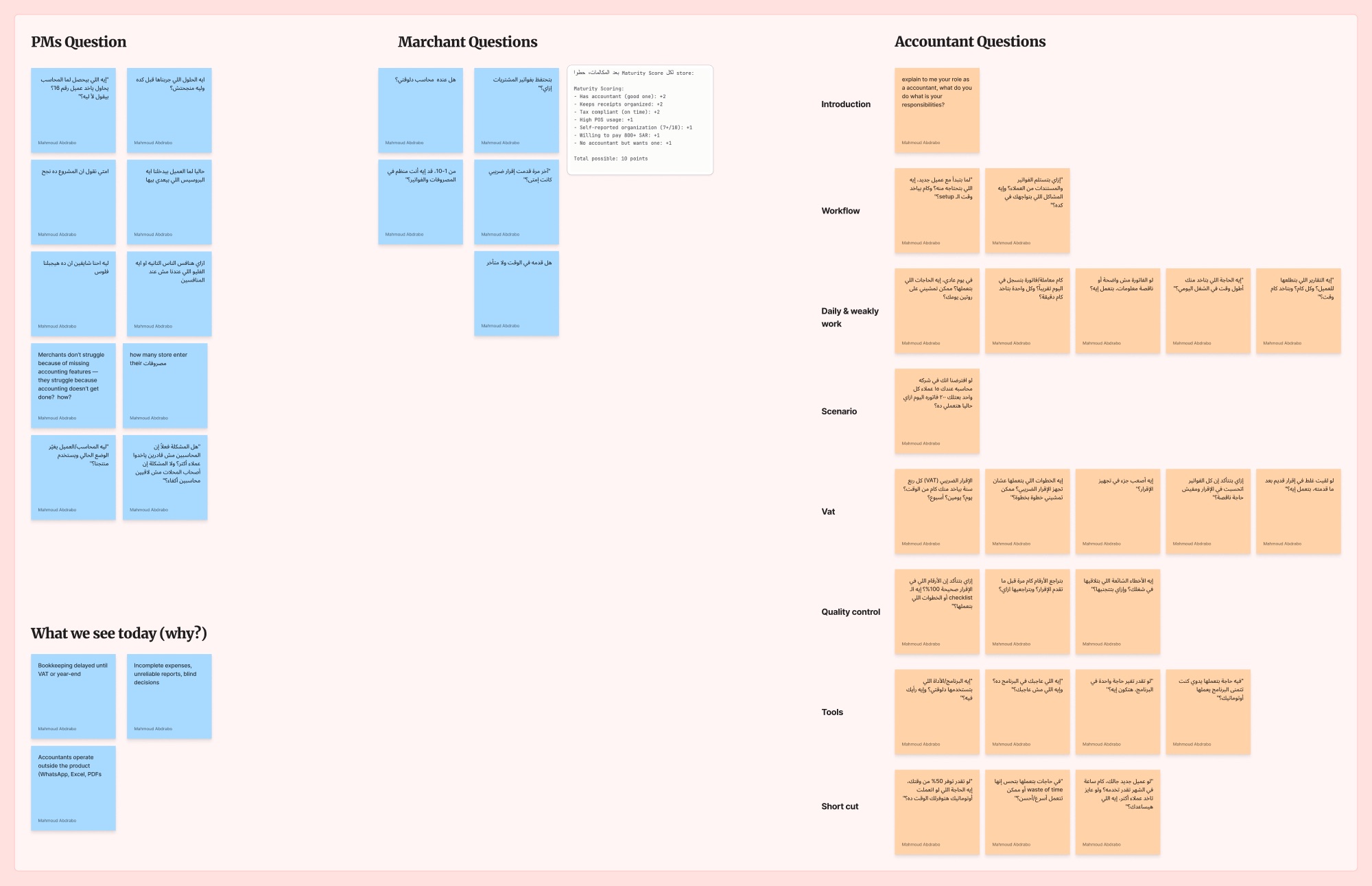
I wrote separate guides for product managers, merchants and accountants. The accountant guide walks through a normal day, a scenario of 15 clients each sending 200 invoices, quarterly VAT, quality checks and tools. The merchant guide covers how they keep purchase invoices, how organized they rate themselves, and when they last filed VAT. To choose who to talk to, I built a 10-point merchant maturity score: has an accountant, keeps receipts organized, files tax on time, POS usage, self-rated organization and willingness to pay.
Where the time goes
Four frictions kept repeating: document collection (unclear photos, clients sending everything at the end of the month, up to a day or two of back and forth for one usable document), manual data entry, back and forth between accountant and client, and waiting on client delays. One accountant needed to chase a big client three times for a single clear invoice. One engagement ended because the client had no documents to share.
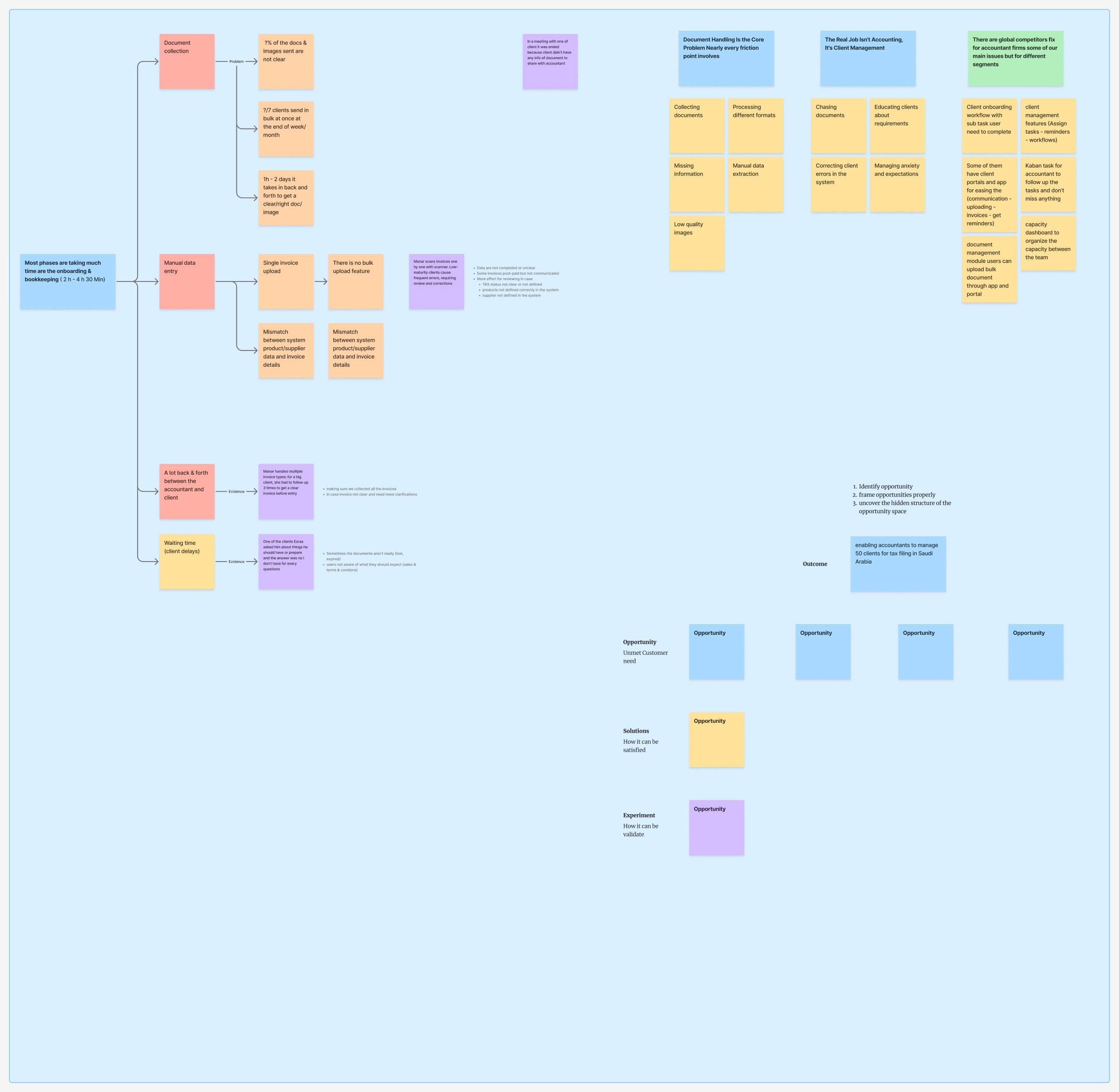
Merchants don’t struggle because accounting features are missing. They struggle because accounting doesn’t get done.
Three themes came out of it. Document handling is the core problem. The accountant’s real job is client management: chasing documents, educating clients, correcting errors and managing anxiety. And global competitors already solve parts of this, for different segments. The outcome I framed: enable an accountant to manage 50 clients for tax filing in Saudi Arabia.
The decision was for merchants to enter invoices themselves using Musaed, tested first with the current client list, against five risks: adoption, accountant capacity, trust in AI with financial data, whether AI can do bookkeeping well enough, and whether the subscription is worth paying for. The targets were an invoice uploaded in under 8 minutes, 70% adoption and retention after one week. These were targets set during discovery, not results.
How others make it work
I compared Rewaa’s accountant module against Foodics, Daftra, Odoo and Smaak, and studied practice-management tools (Karbon, TaxDome, Pixie). Then I looked at how AI bookkeeping businesses make money: concierge services like Bench, Truewind, Zeni and Pilot, and AI platforms sold to accountants. Their margins hold up for three reasons: standardized workflows, AI doing the work while the accountant only reviews, and stickiness once the books live there.
The part I took into the design was how these products handle being wrong. Six patterns repeated: confidence scoring, learning from corrections, vendor memory, rule-based overrides, a loop to ask the client for clarification, and anomaly detection.
| Who we looked at | Examples | What we took |
|---|---|---|
| POS and accounting rivals | Foodics, Daftra, Odoo, Smaak | Rewaa already covered all nine core features but about half of the advanced set. Only Rewaa and Odoo could read invoices automatically. |
| Practice-management tools | Karbon, TaxDome, Pixie | Workflow automation, client portals and automatic reminders. |
| AI bookkeeping services | Bench, Truewind, Zeni, Pilot | AI does the work and the accountant only reviews, plus six patterns for handling being wrong. |
These tools serve firms of different maturity, so we borrowed ideas rather than copying them.
When the AI must ask
The happy path is a chat with starter questions and a photo upload from a bottom sheet. The merchant photographs an invoice, sends it with “add this invoice”, and the reply confirms that supplier, products and payment were matched and the invoice went to the accountant for review.
 1 · Ask
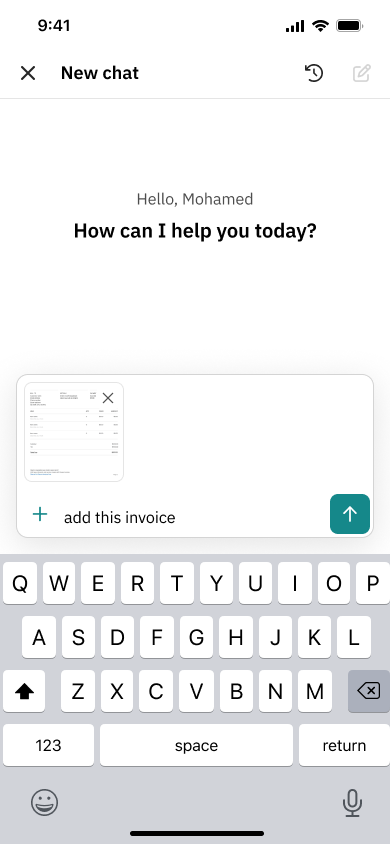 2 · Attach
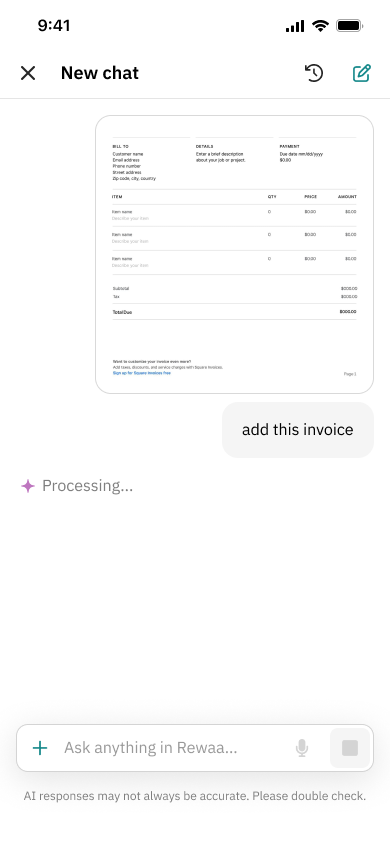 3 · Read
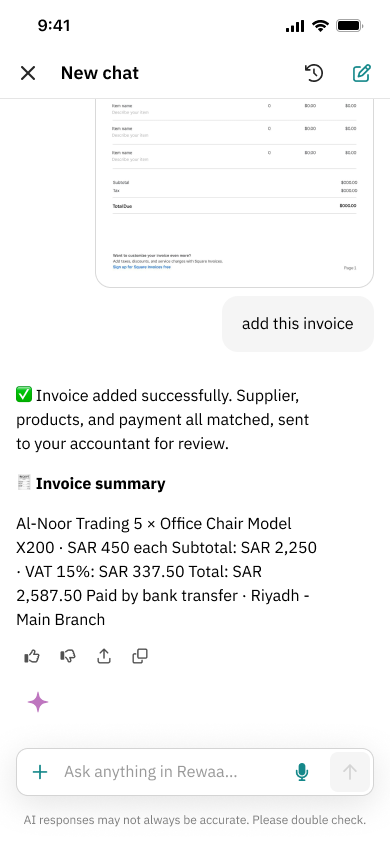 4 · Matched
Around it I designed four flags, the moments when the AI cannot decide and must ask instead of guessing:
- Payment method. Cash, card, SoftPos or a specific bank account, with Skip always available.
- Invoice scanning error. Say why the photo failed, then give tips for lighting, shooting from directly above and keeping text in focus.
- Multiple branches. Pick the branch the expense belongs to.
- Supplier match. When a supplier name is a 50 to 70% match, ask “Yes, this is the supplier” or “No, it’s not”, with “Something else” always available.
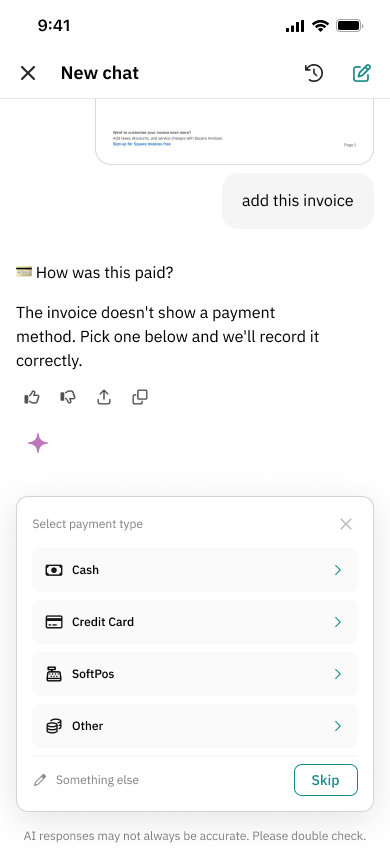 Payment method
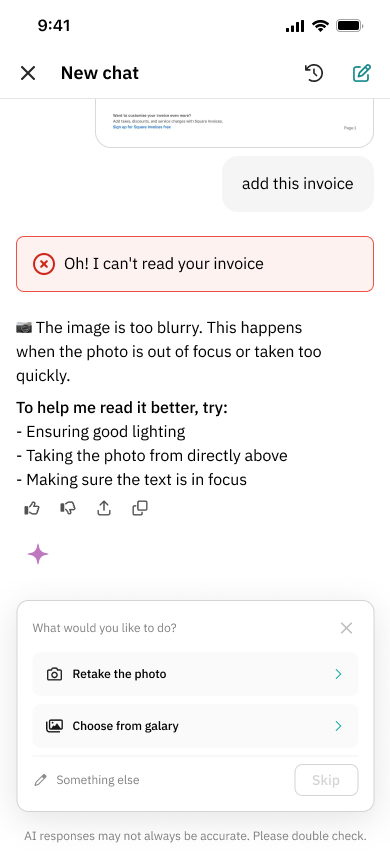 Scan error
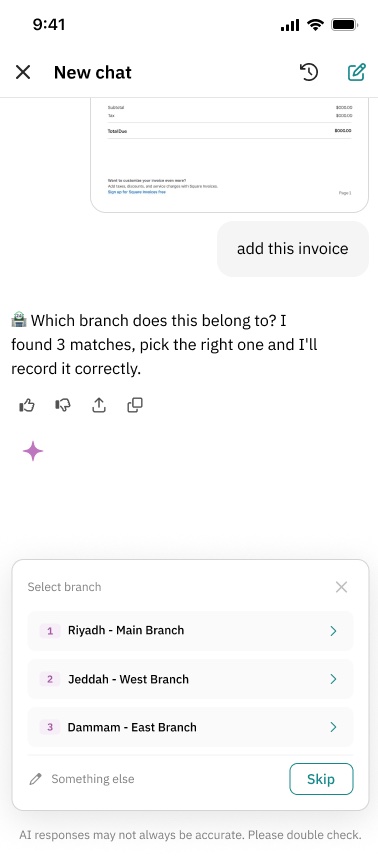 Branch
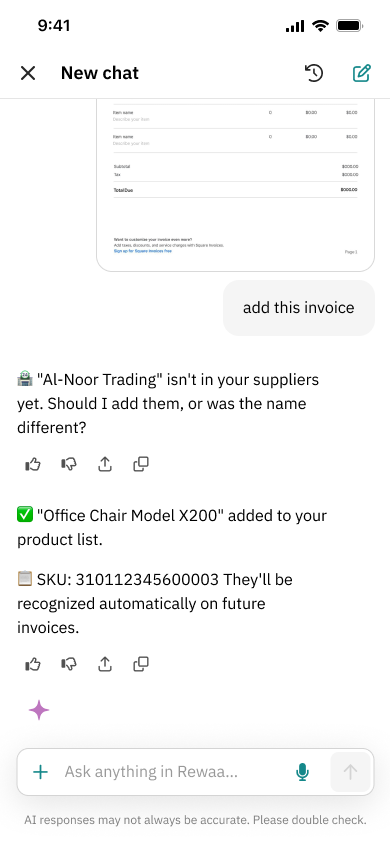 New supplier
When one invoice has several questions
Real invoices rarely have just one gap. With a few questions, the assistant walks through them one by one and counts them down (“1 of 3”). With five or more, it asks first: fix them now, in about two minutes, or send the invoice to the accountant.
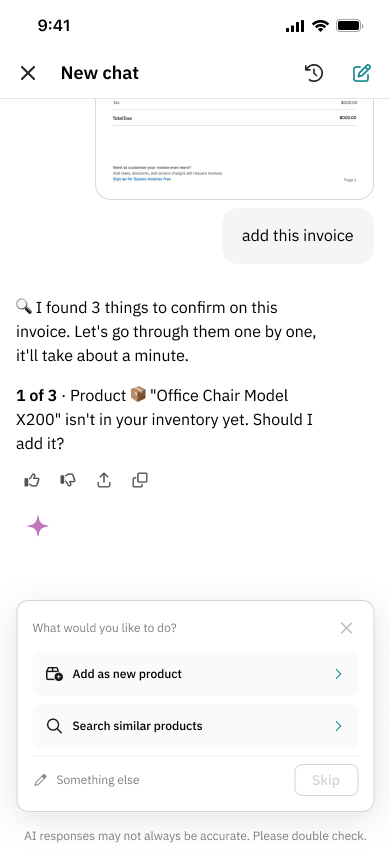 3 to confirm
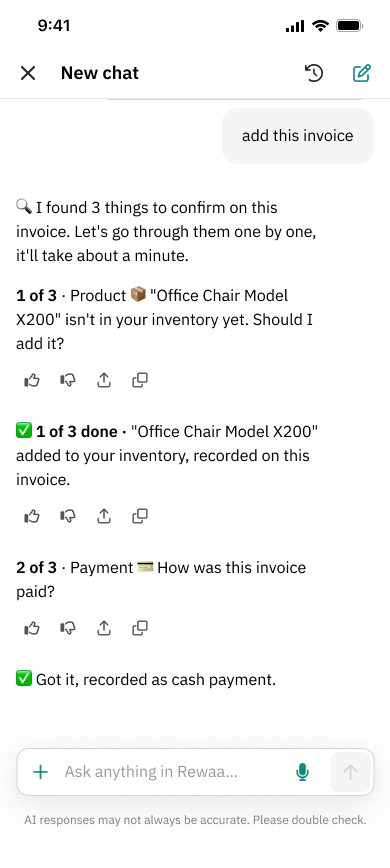 One by one
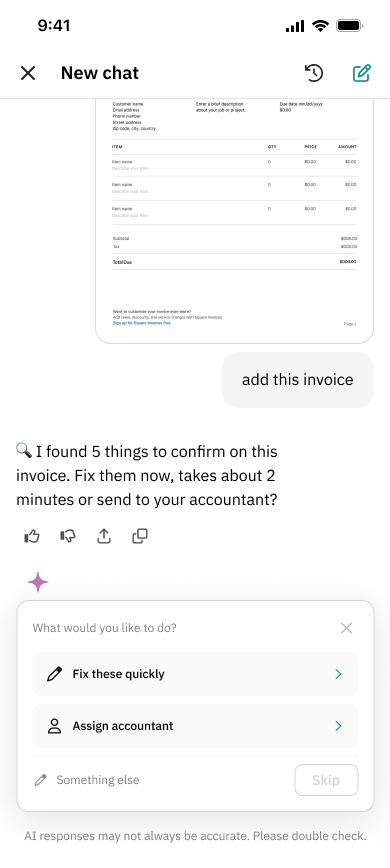 5 to confirm
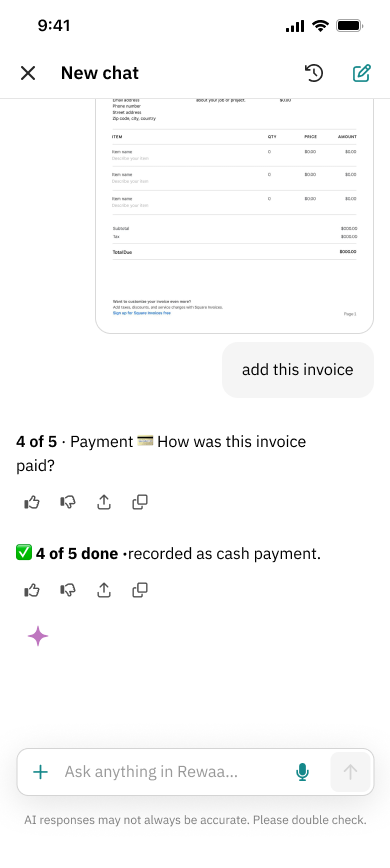 Done, or handed off
What went to engineering
Every flag was drawn for three cases: the AI is sure, it’s unsure, or it finds nothing. This is the behavior handed to engineering.
| Flag | Sure | Unsure | Nothing found |
|---|---|---|---|
| Supplier | Recorded automatically | “Did you mean Al-Noor Trading?” with Yes or No | Add as a new supplier, or search similar ones |
| Product | Recorded, and remembered for next time | Similar products to pick from | Add as a new product, or search similar ones |
| Payment method | Read from the invoice | — | Asks: cash, credit card, SoftPos or other |
| Branch | Recorded | — | Asks which of the merchant’s branches |
| Photo | Read and processed | — | Says why it failed, gives three tips, offers a retake |
Every question keeps “Something else” and Skip, so the merchant is never stuck in a choice that doesn’t fit.
Pressure-testing the designs
Each concept was critiqued against the merchant, who is not an accountant. For the invoice-question flow I compared three models.
| Compared on | Sequential chat | Single form | Compact-fold form |
|---|---|---|---|
| How it works | One question per message | All questions at once | One question open at a time, answered ones fold to a line |
| Strength | Guided, familiar | Fast to scan and edit | Guided and fast, with inline follow-ups |
| Main risk | Slow, long thread | Overload; pre-selected defaults on low-confidence matches look like answers | Auto-advance on mobile, edit discoverability, tall cards |
I built the accountant entry point as a clickable canvas with linked screens, so the product manager could play the flow and react to it, not to a static frame.
What the work actually found
Three specific findings shaped the design.
The extra step was friction
My first entry point opened a confirmation sheet. The button already said what it did, so I removed the sheet.
Chat should be primary, and the call should stay
I compared five action patterns and locked one: a primary “chat with your accountant” button with a quiet “Prefer a call instead?” link below, so the earlier call feature stays available without competing.
The risk in the form was a guess dressed as an answer.
Pre-selected defaults on low-confidence AI matches would make a guess look like a decision. The refined form keeps low-confidence answers unselected and posts only on one deferred Submit, to an endpoint with no language model in the write path.
The critique also raised risks I carried into testing: auto-advance on touch screens, whether merchants can find how to edit a folded answer, the worst-case card height, whether the AI’s reasoning stays visible after folding, and the clarity of the skip copy that hands a question to the accountant.
Building trust in layers, not one message
A single notice would not correct a wrong belief, so the first release uses four small touchpoints, all from existing components with no new AI logic:
- A home banner showing the accountant’s last message and unread count, so the accountant is visible before the merchant opens the AI.
- The accountant’s avatar with a badge in the AI chat header, a constant reminder that a person is one tap away.
- A notice above the message box: “Your accountant can’t see this chat.” It corrects the belief at the moment the merchant types.
- A “Start chat” button in the first-time state, replacing an ambiguous arrow.
The handoff flow stays on the same canvas, labeled as a later phase, so the stronger idea was kept without blocking the release.
Auditing the build, then writing the rules
Once engineering shipped the beta, I tested it the way a merchant would: four real receipts and tax invoices from Saudi shops, photographed on a phone, with the app in Arabic.
Every gap went on the board in the same shape: what happened, what should happen, and the rule behind it. The rule is the part that lasts. It fixes the whole class of problem rather than one screen, and it gives engineering and the AI prompt something they can test against.
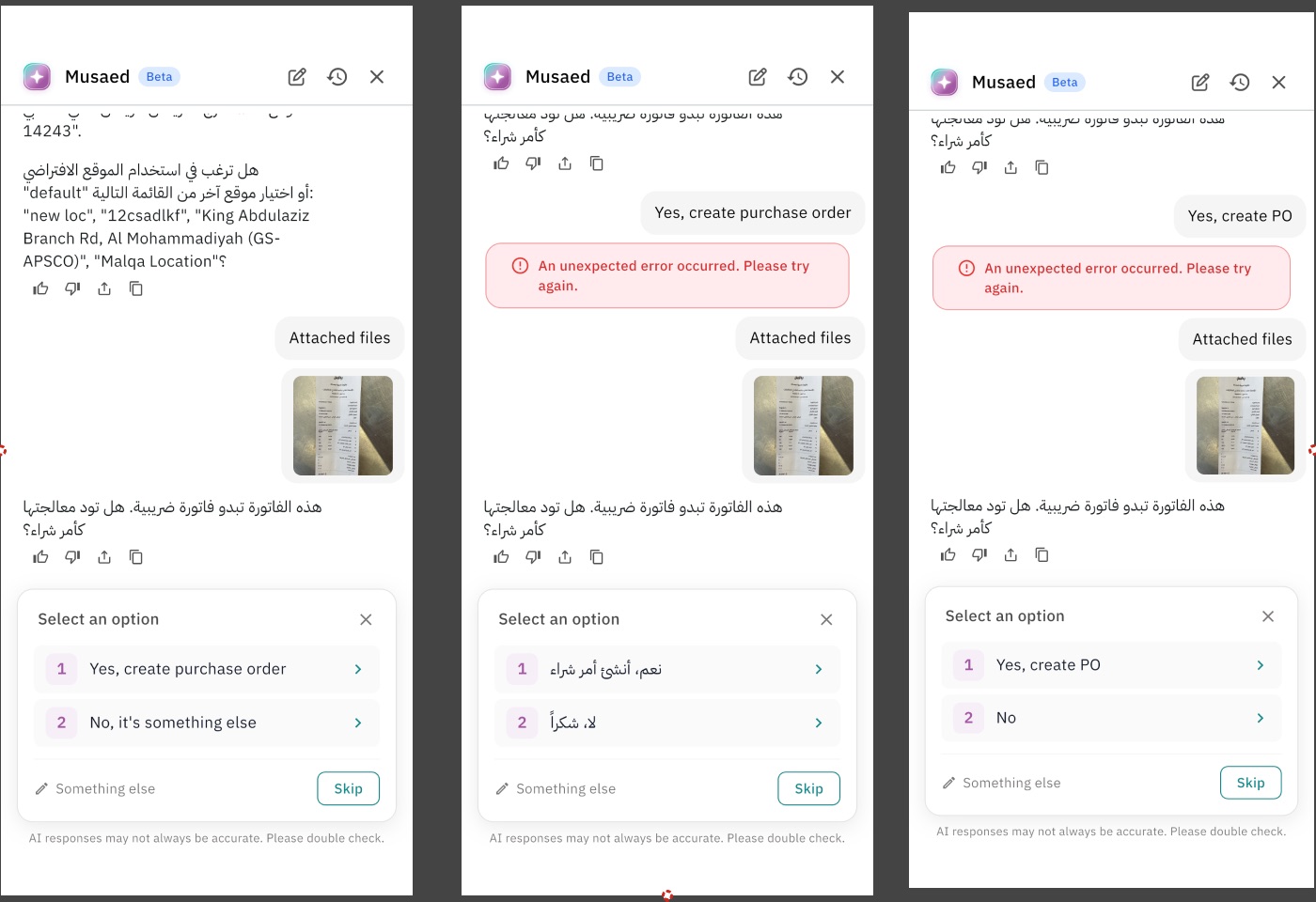
15 issues, 15 rules
- Feedback
After the photo was read, the chat sat on “Calculating…” with no sign of progress.
Never leave the merchant in a silent wait. Options appear within 3 seconds; anything longer shows what is happening, step by step.
- Feedback
“Calculating…” suggested maths while the AI was reading a document.
A loading label describes what the system is doing. Document work always says “Processing…”.
- Timing
After a long wait, Musaed asked “Do you want to process this as a purchase order?” though the merchant had uploaded it for exactly that.
Infer intent from context and confirm after. If it is genuinely unclear, ask before processing starts, never after the merchant has waited.
- Timing
The sheet asked whether the order was Complete or Draft, a system status, at the moment the merchant wanted to add the next one.
An action sheet asks about the merchant’s next decision, not a system state.
- Timing
Picking an existing supplier or adding a new one came as one dense message.
One decision per step. Split compound questions into a sequence.
- Relevance
The supplier list showed every supplier in the account, unrelated to the invoice.
Filter suggestions by the invoice: name first, then category, then past transactions. No close match means no suggestions, only “Add new supplier”.
- Language
Action sheet options switched between Arabic and English inside the same flow.
Every option follows the app language, set by locale and never hardcoded per state.
- Language
The same question appeared three ways: “create purchase order”, its Arabic version, and “create PO”.
Exactly one string per action per locale. No abbreviations in labels, no duplicate variants.
- Language
Every sheet was titled “Select an option”.
The title names the decision: “Select supplier”, “Select branch”, “Select category”.
- Errors
“An unexpected error occurred. Please try again.” In English, inside an Arabic app.
System messages, errors included, follow the app language.
- Errors
The error didn’t say what failed, whether data was lost, or what “try again” meant.
Every error carries a cause and a recovery: “We couldn’t read the invoice. Check the photo is clear and send it again, or contact support.”
- Errors
Locking the phone ended the session and lost the half-finished invoice.
An accounting flow survives screen lock and backgrounding, and resumes where it left off. If it truly expired, restore the context and say so.
- Visual
“Add new supplier” sat below the fold with no hint to scroll.
The primary way forward is always visible. Never make the merchant scroll to discover it.
- Visual
Data, summaries, questions and loading states all used the same bubble.
Anything that needs the merchant’s input looks different from information.
- Visual
Options were text only, and the icons that did appear came from a different pack.
Icons are part of the meaning: add, search, confirm and skip each get their design-system icon on every sheet.
What the build showed, and what the design asks for
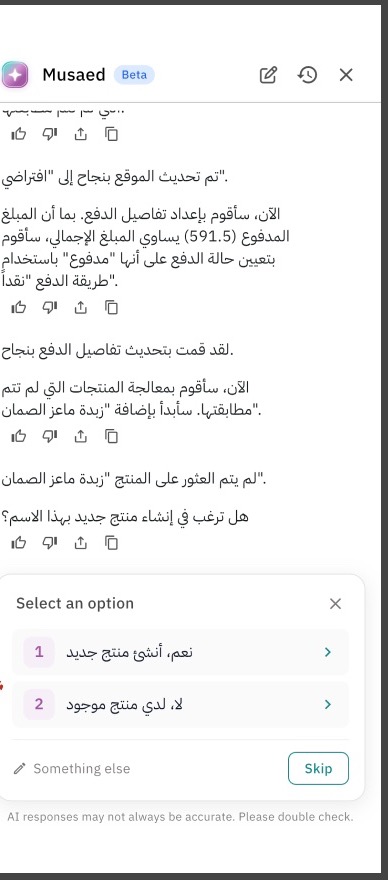 Shipped build: generic title, text only
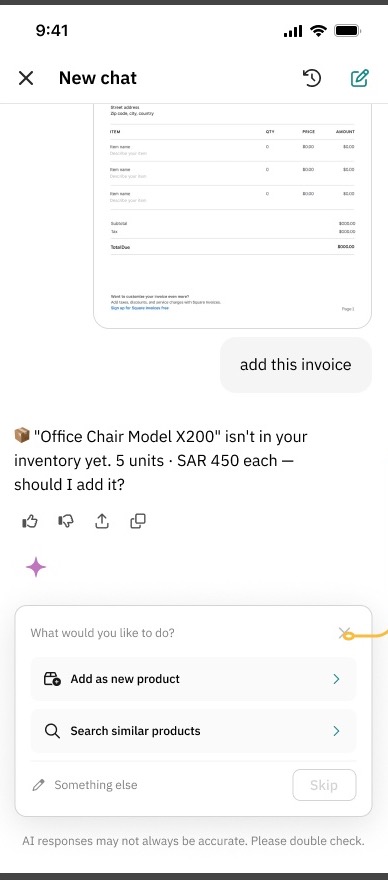 Design: names the problem, icon per option
The rules are written to outlive this flow. Any action sheet, loading state or error in Musaed can be checked against them before it ships.
What this proved
In its first month the service went from 0 to 130 merchants.
The proof is in the decisions. A merchant could easily read this product as one helper that sees everything. The design makes three promises visible instead: who is here, what they can see, and where a human takes over.
These are the signals I would track to separate what the interface contributed from demand for the service itself:
| Metric | What it shows | Where it comes from |
|---|---|---|
| Accountant chat starts per active merchant | Whether the entry point is found | Chat events by entry point |
| Chat starts from inside the AI chat | Whether the badge and notice fix discoverability | Header badge and notice clicks |
| Support messages asking “can my accountant see this?” | Whether the mental model is corrected | Intercom search before and after |
| Invoice questions answered without skipping | AI resolution quality | Form submissions versus skips |
| Edits after submit | Whether low-confidence defaults caused errors | Edit events |
Team on this project: